Enter the file name, and select the appropriate operating system to find the files you need:
FileName
facebook gameroom browser.exe
Comments
-
InternalName
CefSharp.BrowserSubprocess.exe
Facebook Gameroom Browser.exe
Facebook Gameroom Browser.exe
ProductName
CefSharp
CompanyName
The CefSharp Authors
LegalCopyright
Copyright ? The CefSharp Authors 2010-2016
Copyright ? 2010-2017 The CefSharp Authors
Copyright ? 2010-2017 The CefSharp Authors
ProductVersion
55.0.0.0
57.0.0.0
63.0.0.0
57.0.0.0
63.0.0.0
FileDescription
CefSharp.BrowserSubprocess
Facebook Gameroom Browser
Facebook Gameroom Browser
LegalTrademarks
-
PrivateBuild
-
OriginalFilename
CefSharp.BrowserSubprocess.exe
Facebook Gameroom Browser.exe
Facebook Gameroom Browser.exe
SpecialBuild
-
This file can be used in the following paths:
File Version
File Md5
File Bit
File Size
Download
55.0.0.0
2745b2ba74f42a5c0596b011d9addc8732 bit14 KDownload this files 55.0.0.0
b0e62404a346171aa9fb3ae04ab033c132 bit11 KDownload this files 57.0.0.0
f5c70a7a1d1ec8adbd8e372e9b639f9732 bit42 KDownload this files 55.0.0.0
47e742886a8f3415b8d23b5168b5c15b32 bit11 KDownload this files 57.0.0.0
977845f3a67abd99923675e8b211e0ad32 bit42 KDownload this files 57.0.0.0
2bdc0190b73d749ab27d1c380ab2d57332 bit42 KDownload this files 57.0.0.0
1565b242e974794c906ddf30f306bd9132 bit42 KDownload this files 63.0.0.0
b27238436b7c10eadfafd0b8fa39c89832 bit42 KDownload this files 63.0.0.0
1f12ff51356a284226bfa490a0859ee932 bit42 KDownload this files 63.0.0.0
da54361834e1671cc7a35849f9caaafb32 bit42 KDownload this files 63.0.0.0
eb7620b5338b13d2338c809e7622842b32 bit42 KDownload this files 57.0.0.0
1dc13a44ca6a539ed95d4a262d04875632 bit42 KDownload this files 63.0.0.0
04b4972666148f9c1375931d63ef4d2432 bit46 KDownload this files 63.0.0.0
90350c02b56b19aa860d45f433a2ebe632 bit46 KDownload this files 63.0.0.0
af92225203a33d854e9ef82133514e4632 bit46 KDownload this files 63.0.0.0
73cd85cbcc5f4639e324809aecbd665732 bit46 KDownload this files
- • c:\administrator\appdata\local\facebook\games\
- • c:\user\appdata\local\facebook\games\
- • c:\admin\appdata\local\facebook\games\
- • c:\kavin\appdata\local\facebook\games\
- • c:\usuario\appdata\local\facebook\games\
- • c:\razvan\appdata\local\facebook\games\
- • c:\kimthorne\appdata\local\facebook\games\
- • c:\darklord\appdata\local\facebook\games\
- • c:\graphic\appdata\local\facebook\games\
- • c:\homecs\appdata\local\facebook\games\
- • c:\fcc\appdata\local\facebook\games\
- • c:\korisnik\appdata\local\facebook\games\
- • c:\marwan\appdata\local\facebook\games\
- • c:\rschm\appdata\local\facebook\games\
The above paths are the common paths where this file is located, but does not mean that it must be stored in the above paths. The file should be stored in the actual installation path of the software.
Tip: If you cannot find the software installation path, you can follow the path suggested above, find one by one, and put the file inside the path found.
Tip: If you cannot find the software installation path, you can follow the path suggested above, find one by one, and put the file inside the path found.
Tip: How to correctly select the file you need
1. If you know MD5 value of the required files, it is the best approach to make choice
2. If your original file is just corrupted but not lost, then please check the version number of your files. (Method: Click your original file, and then click on the right key to select "Properties" from the pop-up menu, you can see the version number of the files)
3. If your operating system is 32-bit, you must download 32-bit files, because 64-bit programs are unable to run in the 32-bit operating system.
4. There is a special case that, the operating system is a 64-bit system, but you are not sure whether the program is 32-bit or 64-bit. If you encounter this situation, check the file path to see whether there are any other files located in. If yes, please check the properties of these files, and you will know if the file you need is 32-bit or 64-bit.
If you still can't find the file you need, you can leave a "message" on the webpage.
Download facebook gameroom browser.exe file:
If you also need to download other files, you can enter the file name in the input box.
1 Enter the file name
2 Click download link and go to the download page of the file.
Enter the file name:

Next, please confirm file verion, and select the proper download link.
click "Download" to enter its download page.
click "Download" to enter its download page.

File Finder:
• Can't find the version of the file you need?
• The downloaded file cannot be used due to unstable network?
You can try to use this file finder. The method is very simple. Enter the file name, and you will find many versions of this file. Select the file version you need to download, this tool will automatically download a complete file for you.
Click Here Download File Finder

If you have any further questions or need help, please leave us a message:
 [2018-01-15]
 Michael Gosney
 Message
  Hello,it's sunday,january 14th and I've been playing golf clash without any trouble in gameroom for a few months.I was playing earlier today without trouble,yet trying to play again,now I get the "browser does not support WEBGL"message.I'm wondering why suddenly WEBGL is involved and is there a fix.?I will not install WINDOWS 10 it's probably the worst OS microsoft has put out and gaming is impossible with it.Please help if possible and thank you and happy 2018.
Reply: My friend, in fact, a very large number of people encountered this problem; I suggest you use the following three browsers:
Mozilla Firefox
Google Chrome
Apple Safari
By following the method below, you can solve this problem:
Make sure that WebGL is turned on in your browser settings
For Google Chrome:
1. Enter "chrome://flags" in your browser

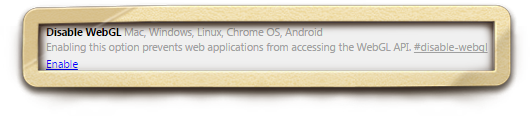
2. In the list that appears, choose WebGL
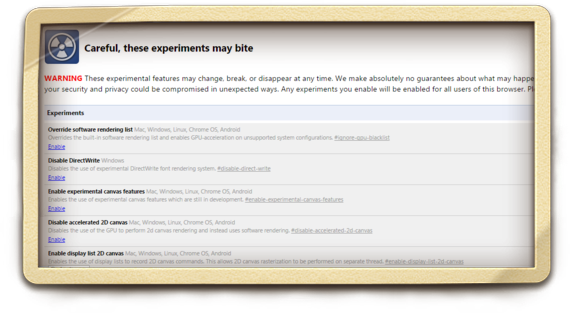
3. Click on Enable
4. Restart the system
For Mozilla Firefox:
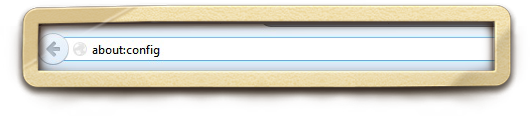
1. Enter "about:config" without or www in your browser
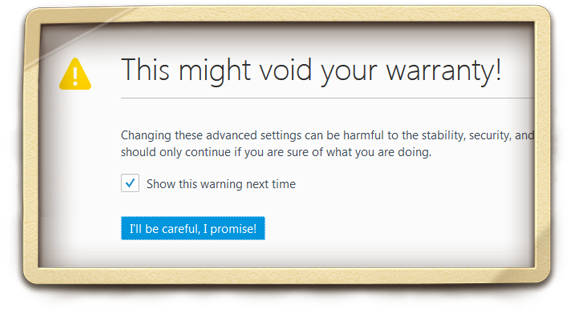
2. In the window that appears, click on "I'll be careful, I promise!"
3. Enter "webgl.force-enabled" in the address bar and double-click to set the value in the Value column to True
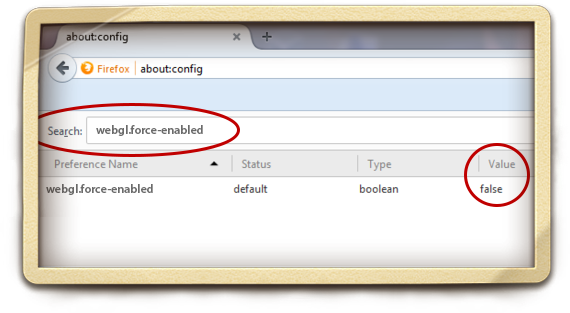
4. Restart the system
For Safari:
1. Choose Preferences... in the Safari drop-down menu
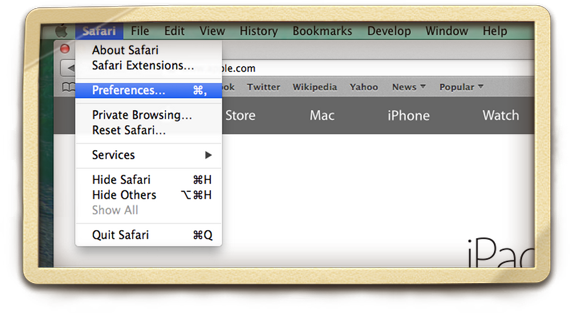
2. Go to the Security tab and click Allow WebGL in the Web content submenu
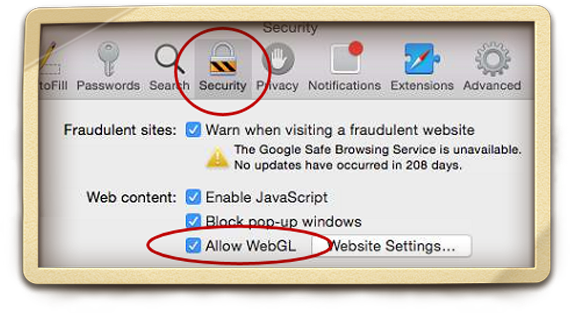
3. Restart the system
Good luck!!!
Mozilla Firefox
Google Chrome
Apple Safari
By following the method below, you can solve this problem:
Make sure that WebGL is turned on in your browser settings
For Google Chrome:
1. Enter "chrome://flags" in your browser
2. In the list that appears, choose WebGL
3. Click on Enable
4. Restart the system
For Mozilla Firefox:
1. Enter "about:config" without or www in your browser
2. In the window that appears, click on "I'll be careful, I promise!"
3. Enter "webgl.force-enabled" in the address bar and double-click to set the value in the Value column to True
4. Restart the system
For Safari:
1. Choose Preferences... in the Safari drop-down menu
2. Go to the Security tab and click Allow WebGL in the Web content submenu
3. Restart the system
Good luck!!!
Leave a Reply
Your email address will not be published. Required fields are marked *
Your email address will not be published. Required fields are marked *
User Reply & Help
[2025-10-10]rohit say: Ray Trackind 3D After Effect Plugin Elements.axe fileplease Give Me
Reply: The issue with this plugin file is generally not caused by file corruption. It's more likely due to …view >>>
[2025-09-24]Max say: Здравствуйте. Для версии 6.0.1.8186 какой файл нужен? Windows 7 6 ......
Reply: The version you're looking for is currently unavailable. However, the website has files for versions …view >>>
[2025-09-02]программист say: Мне нужен файл rwdesign.dll, чтоб исправно работал Borland C++, ver. ......
Reply: Sorry, but this software is quite outdated, making it difficult to locate files of the corresponding …view >>>
[2025-07-25]Hiren say: i have arpita 2000 software it work correctly in window 7 32 bit but now i want to upgrade my system ......
Reply: I recommend against doing this. Several users have reported that due to compatibility issues, this s …view >>>
[2025-07-18]deepanshu say: SGIBIOSRV.exe File is missing, please provide me
Reply: Currently, only version 0.9.0.22 of this file is available. I'm not sure if this is the exact file y …view >>>
[2025-06-03]Nirgunjivan Swami say: I have arpita 2000 and bhasha bharti software. it was working in previous windows 10 version but cur ......
Reply: The software file is not corrupted. Based on feedback from some users, it has been determined that t …view >>>
Files List:
Other Files Information:
Download fsplib.dll FileDownload fspappctrl.dll File
Download hotkeyapp.exe File
Download afw.sys File
Download networkindicator.exe File
Download cefsharp.browsersubprocess.core.dll File
Download bench32.exe File
Download c2dpushgraph.dll File
Download networkindicator.resources.dll File
Download vistacontrols.dll File
Top Download:
Download bootmgfw.efi FileDownload EXPLORER.EXE File
Download cplexe.exe File
Download winload.exe File
Download SLUI.exe File
Download convlog.exe File
Download bootmgr.efi File
Download ntkrnlpa.exe File
Download L3CODECX.AX File
Download HYPERTRM.EXE File
Top Views:
Download EXPLORER.EXE FileDownload winload.exe File
Download SLUI.exe File
Download gpupdate.exe File
Download bootmgfw.efi File
Download bootmgr.efi File
Download cplexe.exe File
Download HYPERTRM.EXE File
Download convlog.exe File
Download rt640x64.sys File
Other File:
Download esevss.dll FileDownload g3endo_mlsupport.dll File
Download scp_umts.dll File
Download w3sqlv7.dll File
Download sumneu.dll File
Download libmfxaudiosw32.dll File
Download gopromediafolderservice.exe File
Download taggerrt.dll File
Download 0416.e_wihk0e.dll File
Download hwstate.dll File
If you need help, please contact support@pconlife.com through E-mail
Copyright© 2015-2026 pconlife.com All Rights Reserved.