Enter the file name, and select the appropriate operating system to find the files you need:
FileName
windowsanytimeupgradeui.exe
Comments
-
InternalName
Add features to Windows 8
Windows Anytime Upgrade User Interface
Windows Anytime Upgrade User Interface
ProductName
Microsoft? Windows? Operating System
CompanyName
Microsoft Corporation
LegalCopyright
? Microsoft Corporation. All rights reserved.
ProductVersion
6.2.9200.16384
6.1.7600.16385
6.1.7600.16385
FileDescription
Add features to Windows 8
Windows Anytime Upgrade User Interface
Windows Anytime Upgrade User Interface
LegalTrademarks
-
PrivateBuild
-
OriginalFilename
WindowsAnytimeUpgradeUI.exe.mui
SpecialBuild
-
For Windows OS
Windows 8
Windows 7
Windows 7
strMemo
-
Views
3597
Tip: How to correctly select the file you need
1 If you know MD5 value of the required files, it is the best approach to make choice
2 If you do not know MD5 value of files, you can choose the appropriate files by adopting the following three steps:
(1) View the operating system version. (Method: Click "My Computer" on the desktop-> "Properties" to view the operating system version)
(2) If your original file is just corrupted but not lost, then please check the version number of your files. (Method: Click your original file, and then click on the right key to select "Properties" from the pop-up menu, you can see the version number of the files)
(3) Depending on the version number of your existing operating system, and version number of the files, you can select the corresponding files from the list below to download the required files.
If you still can't find the file you need, you can leave a "message" on the webpage.
1 If you know MD5 value of the required files, it is the best approach to make choice
2 If you do not know MD5 value of files, you can choose the appropriate files by adopting the following three steps:
(1) View the operating system version. (Method: Click "My Computer" on the desktop-> "Properties" to view the operating system version)
(2) If your original file is just corrupted but not lost, then please check the version number of your files. (Method: Click your original file, and then click on the right key to select "Properties" from the pop-up menu, you can see the version number of the files)
(3) Depending on the version number of your existing operating system, and version number of the files, you can select the corresponding files from the list below to download the required files.
If you still can't find the file you need, you can leave a "message" on the webpage.
Windows 8
Windows 8 Pro x64:
FileVersionFile Md5File SizeFile BitFile Path
6.2.9200.16384 (win8_rtm.120725-1247)3cdd4e526d46b5945ff481fe222b6cc2607 K64 bitDownload this files and unzip them (How to download?)
please place the unpacked files in the following path:
please place the unpacked files in the following path:
- • C:\Windows\system32\
- • C:\Windows\WinSxS\amd64_microsoft-windows-anytime-upgradeui_31bf3856ad364e35_6.2.9200.16384_none_4782a97b889f34bd\
Windows 8 x64:
FileVersionFile Md5File SizeFile BitFile Path
6.2.9200.16384 (win8_rtm.120725-1247)3cdd4e526d46b5945ff481fe222b6cc2607 K64 bitDownload this files and unzip them (How to download?)
please place the unpacked files in the following path:
please place the unpacked files in the following path:
- • C:\Windows\system32\
- • C:\Windows\WinSxS\amd64_microsoft-windows-anytime-upgradeui_31bf3856ad364e35_6.2.9200.16384_none_4782a97b889f34bd\
Windows 8 Pro x32:
FileVersionFile Md5File SizeFile BitFile Path
6.2.9200.16384 (win8_rtm.120725-1247)8e67988cd314ea36f4619b58aa49e2a6479 K32 bitDownload this files and unzip them (How to download?)
please place the unpacked files in the following path:
please place the unpacked files in the following path:
- • C:\Windows\system32\
- • C:\Windows\WinSxS\x86_microsoft-windows-anytime-upgradeui_31bf3856ad364e35_6.2.9200.16384_none_eb640df7d041c387\
Windows 8 x32:
FileVersionFile Md5File SizeFile BitFile Path
6.2.9200.16384 (win8_rtm.120725-1247)8e67988cd314ea36f4619b58aa49e2a6479 K32 bitDownload this files and unzip them (How to download?)
please place the unpacked files in the following path:
please place the unpacked files in the following path:
- • C:\Windows\system32\
- • C:\Windows\WinSxS\x86_microsoft-windows-anytime-upgradeui_31bf3856ad364e35_6.2.9200.16384_none_eb640df7d041c387\
Windows 7
Windows 7 Ultimate x32 Service Pack1:
FileVersionFile Md5File SizeFile BitFile Path
6.1.7600.16385 (win7_rtm.090713-1255)90766f3987aa34bc5d6eae8a38c1f533368 K32 bitDownload this files and unzip them (How to download?)
please place the unpacked files in the following path:
please place the unpacked files in the following path:
- • C:\Windows\winsxs\x86_microsoft-windows-anytime-upgradeui_31bf3856ad364e35_6.1.7600.16385_none_ee8f583a602e9437\
Windows 7 Starter x32 Service Pack1:
FileVersionFile Md5File SizeFile BitFile Path
6.1.7600.16385 (win7_rtm.090713-1255)90766f3987aa34bc5d6eae8a38c1f533368 K32 bitDownload this files and unzip them (How to download?)
please place the unpacked files in the following path:
please place the unpacked files in the following path:
- • C:\Windows\system32\
- • C:\Windows\winsxs\x86_microsoft-windows-anytime-upgradeui_31bf3856ad364e35_6.1.7600.16385_none_ee8f583a602e9437\
Windows 7 Professional x32 Service Pack1:
FileVersionFile Md5File SizeFile BitFile Path
6.1.7600.16385 (win7_rtm.090713-1255)90766f3987aa34bc5d6eae8a38c1f533368 K32 bitDownload this files and unzip them (How to download?)
please place the unpacked files in the following path:
please place the unpacked files in the following path:
- • C:\Windows\system32\
- • C:\Windows\winsxs\x86_microsoft-windows-anytime-upgradeui_31bf3856ad364e35_6.1.7600.16385_none_ee8f583a602e9437\
Windows 7 Professional x64 Service Pack1:
FileVersionFile Md5File SizeFile BitFile Path
6.1.7600.16385 (win7_rtm.090713-1255)fda49d1d0c201f6c76bd2593f562bf80377 K64 bitDownload this files and unzip them (How to download?)
please place the unpacked files in the following path:
please place the unpacked files in the following path:
- • C:\Windows\system32\
- • C:\Windows\winsxs\amd64_microsoft-windows-anytime-upgradeui_31bf3856ad364e35_6.1.7600.16385_none_4aadf3be188c056d\
Windows 7 Home Premium x32 Service Pack1:
FileVersionFile Md5File SizeFile BitFile Path
6.1.7600.16385 (win7_rtm.090713-1255)90766f3987aa34bc5d6eae8a38c1f533368 K32 bitDownload this files and unzip them (How to download?)
please place the unpacked files in the following path:
please place the unpacked files in the following path:
- • C:\Windows\system32\
- • C:\Windows\winsxs\x86_microsoft-windows-anytime-upgradeui_31bf3856ad364e35_6.1.7600.16385_none_ee8f583a602e9437\
Windows 7 Home Premium x64 Service Pack1:
FileVersionFile Md5File SizeFile BitFile Path
6.1.7600.16385 (win7_rtm.090713-1255)fda49d1d0c201f6c76bd2593f562bf80377 K64 bitDownload this files and unzip them (How to download?)
please place the unpacked files in the following path:
please place the unpacked files in the following path:
- • C:\Windows\system32\
- • C:\Windows\winsxs\amd64_microsoft-windows-anytime-upgradeui_31bf3856ad364e35_6.1.7600.16385_none_4aadf3be188c056d\
Windows 7 Home Basic x32 Service Pack1:
FileVersionFile Md5File SizeFile BitFile Path
6.1.7600.16385 (win7_rtm.090713-1255)90766f3987aa34bc5d6eae8a38c1f533368 K32 bitDownload this files and unzip them (How to download?)
please place the unpacked files in the following path:
please place the unpacked files in the following path:
- • C:\Windows\system32\
- • C:\Windows\winsxs\x86_microsoft-windows-anytime-upgradeui_31bf3856ad364e35_6.1.7600.16385_none_ee8f583a602e9437\
How to download windowsanytimeupgradeui.exe file:
1 Choose your operating system version
2 Click download link and go to the download page of the file.
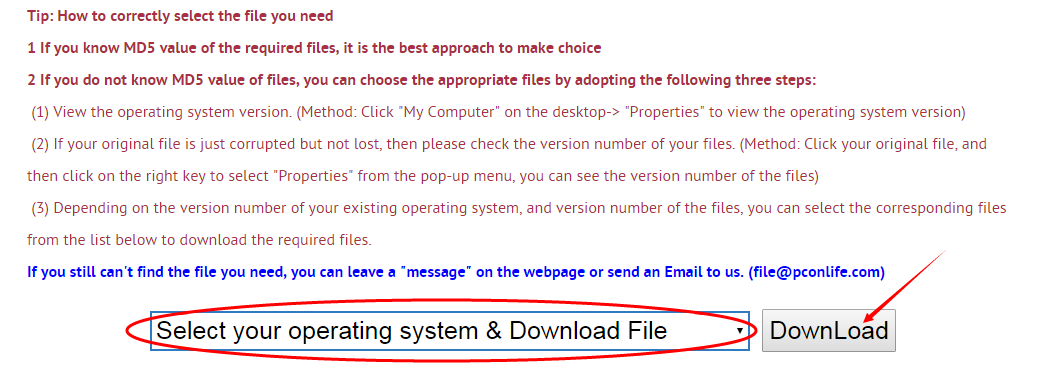
Firstly, select your Operating System on the blank, and then click "Download" button, and it will quickly redirect to the file download list as the picture below:
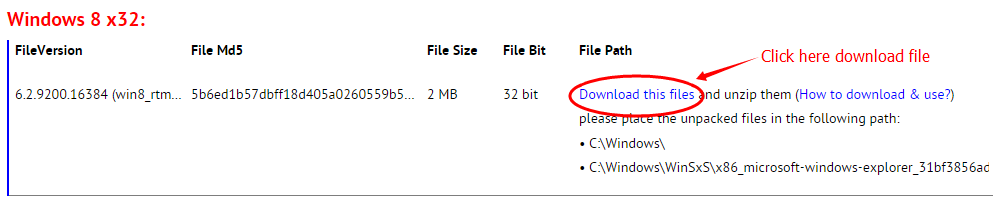
Next, please confirm your verion of OS, and select the proper download link.
click "Download this file" to enter its download page.
click "Download this file" to enter its download page.
File Finder:
• Can't find the version of the file you need?
• The downloaded file cannot be used due to unstable network?
You can try to use this file finder. The method is very simple. Enter the file name, and you will find many versions of this file. Select the file version you need to download, this tool will automatically download a complete file for you.
Click Here Download File Finder

If you have any further questions or need help, please leave us a message:
 [2017-04-12]
 Joel Breger
 Help
Help  Windows 8.1
  I am using Windows 8.1 (neither home nor pro) and want to do an "in-place" upgrade of my OS (including perhaps 100 hours of software installs)to Windows 10 Pro. I have downloaded the Windows 10 setup files from the Windows 10 setup webpage and used the "media creation tool" to create a bootable USB drive. Prior to that, I purchased a CD key for Windows 10 Professional. When I put the Win 10 Pro flash drive into the machine and ran "setup.exe," I was NOT asked for a CD key but I was immediately informed that my machine would end up having Windows 10 Home installed and that only the essentially worthless "apps" would continue to work. I was never even asked for the CD key that I purchased and was unpleasantly surprised that the "mediacreation tool" not only failed to offer the choice of an "in-place upgrade" but also determined that I could not do that "upgrade" to the "Pro" version of Windows 10.
I have read in several places that the best way for me to proceed is to invoke an "in-place" upgrade and that it is almost always successful.
How can I accomplish what I need to accomplish?
Reply
Reply: First, make sure that the setup file you downloaded is Windows 10 Professional, not Windows 10 Home.
In fact, the installation of Windows 10 does not need to create a bootable USB driver. If you want to upgrade the OS to Windows 10, you can use the built-in Windows Update to upgrade your system; the whole process is fully automatic, and do not need you to operate. However, I do not recommend the use of Windows Update for upgrade, because the network transmission is not reliable, and the installation time will be very long. You can go to download Windows 10 ISO setup file, and the file size is about 6G or so. This is the fastest and most stable. Remember to choose the "Upgrade the old system" option, and do not choose "Newly set up system"; otherwise it will cover all your data. Of course, the safest way is backing up your data before installing your system.
In fact, the installation of Windows 10 does not need to create a bootable USB driver. If you want to upgrade the OS to Windows 10, you can use the built-in Windows Update to upgrade your system; the whole process is fully automatic, and do not need you to operate. However, I do not recommend the use of Windows Update for upgrade, because the network transmission is not reliable, and the installation time will be very long. You can go to download Windows 10 ISO setup file, and the file size is about 6G or so. This is the fastest and most stable. Remember to choose the "Upgrade the old system" option, and do not choose "Newly set up system"; otherwise it will cover all your data. Of course, the safest way is backing up your data before installing your system.
Leave a Reply
Your email address will not be published. Required fields are marked *
Your email address will not be published. Required fields are marked *
Files List:
Other Files Information:
Download Windows.UI.Immersive.dll FileDownload Windows.UI.Input.Inking.dll File
Download Windows.UI.Xaml.dll File
Download Windows.Web.dll File
Download WindowsAnytimeUpgradeResults.exe File
Download windowslivelogin.dll File
Download pspluginwkr-v3.dll.mui File
Download Microsoft.BitLocker.Structures.dll File
Download Microsoft.Dism.Powershell.Resources.dll File
Download Microsoft.Dism.PowerShell.dll File
Top Download:
Download bootmgfw.efi FileDownload EXPLORER.EXE File
Download cplexe.exe File
Download winload.exe File
Download SLUI.exe File
Download convlog.exe File
Download bootmgr.efi File
Download ntkrnlpa.exe File
Download L3CODECX.AX File
Download HYPERTRM.EXE File
If you need help, please contact support@pconlife.com through E-mail
Copyright© 2015-2026 pconlife.com All Rights Reserved.