Enter the file name, and select the appropriate operating system to find the files you need:
FileName
osloader.exe
Comments
-
InternalName
osloader.exe
ProductName
Microsoft? Windows? Operating System
CompanyName
Microsoft Corporation
LegalCopyright
? Microsoft Corporation. All rights reserved.
ProductVersion
5.2.3790.3959
FileDescription
Boot Loader
LegalTrademarks
-
PrivateBuild
-
OriginalFilename
osloader.exe
SpecialBuild
-
For Windows OS
Windows Server 2003
strMemo
-
Views
19687
Tip: How to correctly select the file you need
1 If you know MD5 value of the required files, it is the best approach to make choice
2 If you do not know MD5 value of files, you can choose the appropriate files by adopting the following three steps:
(1) View the operating system version. (Method: Click "My Computer" on the desktop-> "Properties" to view the operating system version)
(2) If your original file is just corrupted but not lost, then please check the version number of your files. (Method: Click your original file, and then click on the right key to select "Properties" from the pop-up menu, you can see the version number of the files)
(3) Depending on the version number of your existing operating system, and version number of the files, you can select the corresponding files from the list below to download the required files.
If you still can't find the file you need, you can leave a "message" on the webpage.
1 If you know MD5 value of the required files, it is the best approach to make choice
2 If you do not know MD5 value of files, you can choose the appropriate files by adopting the following three steps:
(1) View the operating system version. (Method: Click "My Computer" on the desktop-> "Properties" to view the operating system version)
(2) If your original file is just corrupted but not lost, then please check the version number of your files. (Method: Click your original file, and then click on the right key to select "Properties" from the pop-up menu, you can see the version number of the files)
(3) Depending on the version number of your existing operating system, and version number of the files, you can select the corresponding files from the list below to download the required files.
If you still can't find the file you need, you can leave a "message" on the webpage.
Windows Server 2003
Windows Server 2003 Web x32 Service Pack2:
FileVersionFile Md5File SizeFile BitFile Path
5.2.3790.3959 (srv03_sp2_rtm.070216-1710)ed84e9997af156f48e7b2cad0808b1f3270 K32 bitDownload this files and unzip them (How to download?)
please place the unpacked files in the following path:
please place the unpacked files in the following path:
- • C:\Windows\ServicePackFiles\i386\
Windows Server 2003 R2 Enterprise x32 Service Pack2:
FileVersionFile Md5File SizeFile BitFile Path
5.2.3790.3959 (srv03_sp2_rtm.070216-1710)ed84e9997af156f48e7b2cad0808b1f3270 K32 bitDownload this files and unzip them (How to download?)
please place the unpacked files in the following path:
please place the unpacked files in the following path:
- • C:\Windows\ServicePackFiles\i386\
How to download osloader.exe file:
1 Choose your operating system version
2 Click download link and go to the download page of the file.
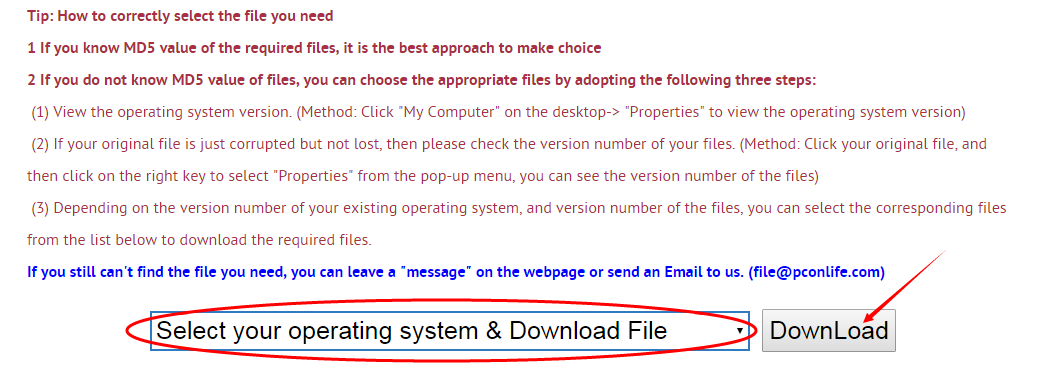
Firstly, select your Operating System on the blank, and then click "Download" button, and it will quickly redirect to the file download list as the picture below:
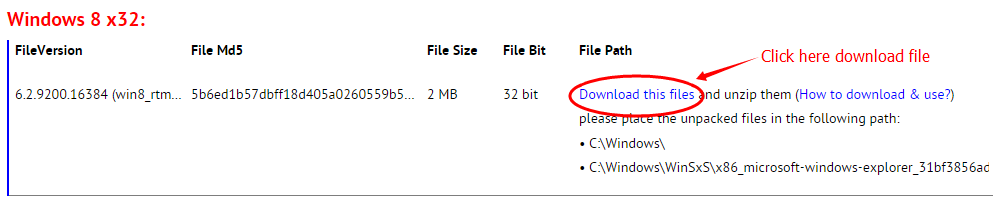
Next, please confirm your verion of OS, and select the proper download link.
click "Download this file" to enter its download page.
click "Download this file" to enter its download page.
File Finder:
• Can't find the version of the file you need?
• The downloaded file cannot be used due to unstable network?
You can try to use this file finder. The method is very simple. Enter the file name, and you will find many versions of this file. Select the file version you need to download, this tool will automatically download a complete file for you.
Click Here Download File Finder

If you have any further questions or need help, please leave us a message:
 [2020-03-17]
 Vishal Kumar Gautam
 Help
Help  Windows 10
  My window 10 show osloader.exe missing and showing below enter=os after clicking enter two options come window 10 and window 10 fast mode i chose window 10 pc start it comes again when i reopen my laptop
Reply
Reply: It is possible that the operating system was damaged by a virus, and the osloader.exe file was also damaged. Recently, there is a virus called Trojan.Siggen9.12065, which will damage some core files of the system and cause window 10 to keep prompting the user to enter fast mode every time it starts up. This Trojan spreads quickly, and many computer operating systems are damaged. It is recommended that you use antivirus software to remove the Trojan, and then download normal files to overwrite the damaged files.
[2020-02-27]
Edward Gardner
Message All Windows OS
\windows\system32\osloader.exewindows 7 64 bit
ver 6.1.7600.16385
happened after a virus
thanks
Reply
Reply: If your system has been damaged by a virus, you should first install a powerful anti-virus software. After removing the virus, download the normal file, and then overwrite the file damaged by the virus. In addition, it is best to enter safe mode and then start anti-virus software to check for viruses, which can remove most viruses.
[2019-01-24]
andrew
Help Windows 8.1
i need to replace my corrupted osloader.exe program so i can fastboot, but i don't know where i can get the file...any help finding a copy would be appreciated.thanks in advance
andrew
Reply
Reply: Currently we have not found osloader.exe for Win8.1, but you can export this file from a machine with Win 8.0 or Win8.1. The steps are:
Open the ntldr file and search for 4D5A (the mz header of the PE). Starting from 4D5A to the end is the binary code of the osloader. Export, and modify into osloader.exe
Open the ntldr file and search for 4D5A (the mz header of the PE). Starting from 4D5A to the end is the binary code of the osloader. Export, and modify into osloader.exe
[2018-01-27]
Kudryavka Noumi
Help Windows 10
Hi, I really need help.I take a virus yesterday, but I fix it.
Now I have only a problem on startup. osloader.exe
I saw the guide on your site and downloaded osloader.exe but there is only 32bit and I have 64bit so I can't start it. What should I do? How I fix this error?
PS: error code 0xc000000f
Reply
Reply: So far I have not noticed that there is a 64-bit version of osloader.exe. The file started working before entering the operating system. It was responsible for loading some data and protecting some important files on the system.
In fact, I suspect that some of your system kernel files have been destroyed by the virus. When osloader.exe starts, certain data or function of these files will be called, as these files are destroyed, osloader.exe running errors occur. The common errors are:
the memory could not be read at "0x00000000"
the memory could not be written at "0x00000000"
I think you need to find an installation CD to re-repair your operating system.
In fact, I suspect that some of your system kernel files have been destroyed by the virus. When osloader.exe starts, certain data or function of these files will be called, as these files are destroyed, osloader.exe running errors occur. The common errors are:
the memory could not be read at "0x00000000"
the memory could not be written at "0x00000000"
I think you need to find an installation CD to re-repair your operating system.
[2017-09-04]
Lily
Help Windows 7
I deleted Bing Search, after which Windows doesn't let me restart it.I click on restart and then it gives me the error message that I'm missing the osloader.exe file?
I then have to click through the error messages before it can finally restart.
PS. I don't have a back-up disk
Reply
Reply: In fact, your problem may not be cause by osloader.exe, and it is likely that the system was infected with the virus, resulting in the system's core file being modified.
osloader.exe is a very important system file which is responsible for loading the system kernel files and drivers.
In addition, osloader.exe file has an output function called BlLoadImage which can load the executable program into memory, and at the same time determine whether the original file was modified.
If your system kernel file has been modified, or the version is wrong, there will be some error messages.
The normal software is not to modify the system core files, so generally your system is likely destroyed by the virus. It is best to use anti-virus software to have a thorough detection.
Here good anti-virus software is recommended. Click here to download antivirus software.
osloader.exe is a very important system file which is responsible for loading the system kernel files and drivers.
In addition, osloader.exe file has an output function called BlLoadImage which can load the executable program into memory, and at the same time determine whether the original file was modified.
If your system kernel file has been modified, or the version is wrong, there will be some error messages.
The normal software is not to modify the system core files, so generally your system is likely destroyed by the virus. It is best to use anti-virus software to have a thorough detection.
Here good anti-virus software is recommended. Click here to download antivirus software.
Leave a Reply
Your email address will not be published. Required fields are marked *
Your email address will not be published. Required fields are marked *
Files List:
Other Files Information:
Download mpe.sys FileDownload mxicfg.dll File
Download mxport.dll File
Download ndisip.sys File
Download ntkrpamp.exe File
Download ovca.sys File
Download ovcam2.sys File
Download ovcd.sys File
Download ovce.sys File
Download ovcodec2.dll File
Top Download:
Download bootmgfw.efi FileDownload EXPLORER.EXE File
Download cplexe.exe File
Download winload.exe File
Download SLUI.exe File
Download convlog.exe File
Download bootmgr.efi File
Download ntkrnlpa.exe File
Download L3CODECX.AX File
Download HYPERTRM.EXE File
If you need help, please contact support@pconlife.com through E-mail
Copyright© 2015-2026 pconlife.com All Rights Reserved.