Enter the file name, and select the appropriate operating system to find the files you need:
FileName
ietimer.ocx
Comments
-
InternalName
IeTimer.Ocx
ProductName
Microsoft(R) Windows NT(R) Operating System
CompanyName
Microsoft Corporation
LegalCopyright
Copyright (C) Microsoft Corp. 1981-1997
ProductVersion
4.72.3110.0
FileDescription
IE Timer
LegalTrademarks
-
PrivateBuild
-
OriginalFilename
IeTimer.Ocx
SpecialBuild
-
For Windows OS
Windows Server 2000
strMemo
-
Views
3206
Tip: How to correctly select the file you need
1 If you know MD5 value of the required files, it is the best approach to make choice
2 If you do not know MD5 value of files, you can choose the appropriate files by adopting the following three steps:
(1) View the operating system version. (Method: Click "My Computer" on the desktop-> "Properties" to view the operating system version)
(2) If your original file is just corrupted but not lost, then please check the version number of your files. (Method: Click your original file, and then click on the right key to select "Properties" from the pop-up menu, you can see the version number of the files)
(3) Depending on the version number of your existing operating system, and version number of the files, you can select the corresponding files from the list below to download the required files.
If you still can't find the file you need, you can leave a "message" on the webpage.
1 If you know MD5 value of the required files, it is the best approach to make choice
2 If you do not know MD5 value of files, you can choose the appropriate files by adopting the following three steps:
(1) View the operating system version. (Method: Click "My Computer" on the desktop-> "Properties" to view the operating system version)
(2) If your original file is just corrupted but not lost, then please check the version number of your files. (Method: Click your original file, and then click on the right key to select "Properties" from the pop-up menu, you can see the version number of the files)
(3) Depending on the version number of your existing operating system, and version number of the files, you can select the corresponding files from the list below to download the required files.
If you still can't find the file you need, you can leave a "message" on the webpage.
Windows Server 2000
Windows 2000 Datacenter Server x32 Service Pack4:
FileVersionFile Md5File SizeFile BitFile Path
4.72.3110.060f7ef0cb0e587f881c1d4b8ea525d3775 K32 bitDownload this files and unzip them (How to download?)
please place the unpacked files in the following path:
please place the unpacked files in the following path:
- • C:\WINNT\system32\
Windows 2000 Advanced Server x32 Service Pack4:
FileVersionFile Md5File SizeFile BitFile Path
4.72.3110.060f7ef0cb0e587f881c1d4b8ea525d3775 K32 bitDownload this files and unzip them (How to download?)
please place the unpacked files in the following path:
please place the unpacked files in the following path:
- • C:\WINNT\system32\
Windows 2000 Server x32 Service Pack4:
FileVersionFile Md5File SizeFile BitFile Path
4.72.3110.060f7ef0cb0e587f881c1d4b8ea525d3775 K32 bitDownload this files and unzip them (How to download?)
please place the unpacked files in the following path:
please place the unpacked files in the following path:
- • C:\WINNT\system32\
How to download ietimer.ocx file:
1 Choose your operating system version
2 Click download link and go to the download page of the file.
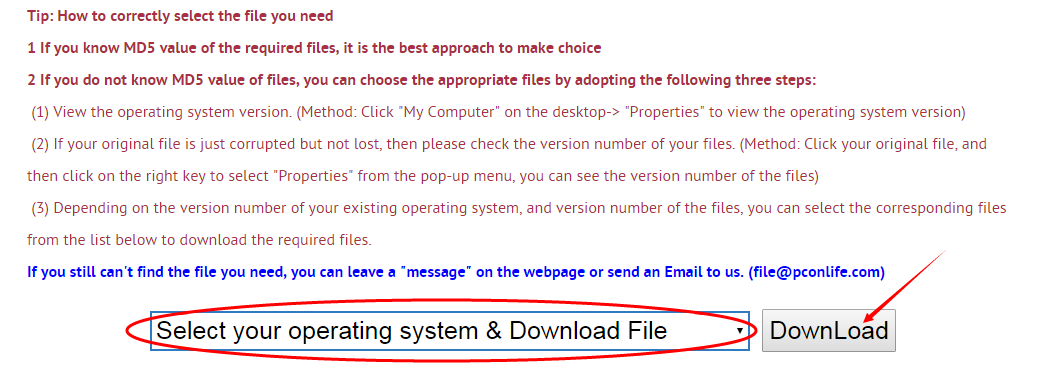
Firstly, select your Operating System on the blank, and then click "Download" button, and it will quickly redirect to the file download list as the picture below:
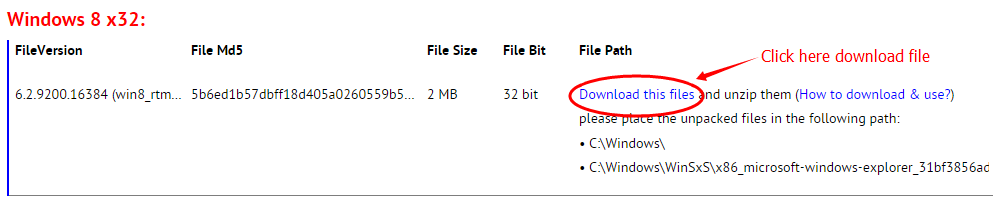
Next, please confirm your verion of OS, and select the proper download link.
click "Download this file" to enter its download page.
click "Download this file" to enter its download page.
File Finder:
• Can't find the version of the file you need?
• The downloaded file cannot be used due to unstable network?
You can try to use this file finder. The method is very simple. Enter the file name, and you will find many versions of this file. Select the file version you need to download, this tool will automatically download a complete file for you.
Click Here Download File Finder

If you have any further questions or need help, please leave us a message:
 [2016-05-22]
 Bernard Nasrallah
 Help
Help  Windows 10
  Hi, I need help with my windows, I had a computer with windows XP and office 2003, I create an excel files with macros, and uses the calendar.ocx and timer.ocx, it worked perfectly, now they give me a computer with windows 8.1 and office 10, the excel files don't work missing files of calendar.ocx and timer.ocx
please I need help
Thankyou
Reply
Reply: I've been looking for this file, but as office 2003 software is too old, it may take some time to find it. Please be patient, we will help you solve the problem as soon as possible.
Leave a Reply
Your email address will not be published. Required fields are marked *
Your email address will not be published. Required fields are marked *
Files List:
Other Files Information:
Download h323.tsp FileDownload hal.dll File
Download hdwwiz.cpl File
Download ielabel.ocx File
Download IEMENU.OCX File
Download dwintl.dll File
Download aqadmin.dll File
Download aqueue.dll File
Download ddrop.dll File
Download isrpc.dll File
Top Download:
Download bootmgfw.efi FileDownload EXPLORER.EXE File
Download cplexe.exe File
Download winload.exe File
Download SLUI.exe File
Download convlog.exe File
Download bootmgr.efi File
Download ntkrnlpa.exe File
Download L3CODECX.AX File
Download HYPERTRM.EXE File
If you need help, please contact support@pconlife.com through E-mail
Copyright© 2015-2026 pconlife.com All Rights Reserved.