Enter the file name, and select the appropriate operating system to find the files you need:
FileName
artico.h1s
Comments
-
InternalName
-
ProductName
-
CompanyName
-
LegalCopyright
? 2005 Microsoft Corporation. All rights reserved.CCCCCCCCCCCCC
ProductVersion
-
FileDescription
Compiled Microsoft Help 2.0 Title
LegalTrademarks
-
PrivateBuild
-
OriginalFilename
-
SpecialBuild
-
For Windows OS
Windows Vista
strMemo
-
Views
1473
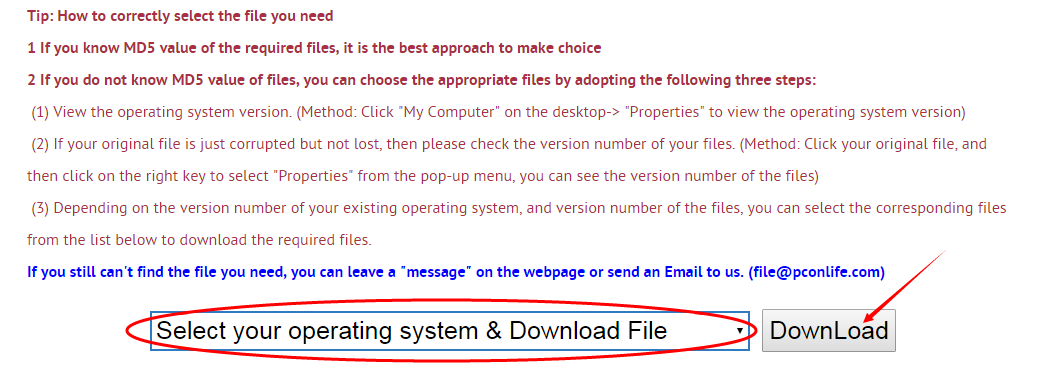
Tip: How to correctly select the file you need
1 If you know MD5 value of the required files, it is the best approach to make choice
2 If you do not know MD5 value of files, you can choose the appropriate files by adopting the following three steps:
(1) View the operating system version. (Method: Click "My Computer" on the desktop-> "Properties" to view the operating system version)
(2) If your original file is just corrupted but not lost, then please check the version number of your files. (Method: Click your original file, and then click on the right key to select "Properties" from the pop-up menu, you can see the version number of the files)
(3) Depending on the version number of your existing operating system, and version number of the files, you can select the corresponding files from the list below to download the required files.
If you still can't find the file you need, you can leave a "message" on the webpage.
1 If you know MD5 value of the required files, it is the best approach to make choice
2 If you do not know MD5 value of files, you can choose the appropriate files by adopting the following three steps:
(1) View the operating system version. (Method: Click "My Computer" on the desktop-> "Properties" to view the operating system version)
(2) If your original file is just corrupted but not lost, then please check the version number of your files. (Method: Click your original file, and then click on the right key to select "Properties" from the pop-up menu, you can see the version number of the files)
(3) Depending on the version number of your existing operating system, and version number of the files, you can select the corresponding files from the list below to download the required files.
If you still can't find the file you need, you can leave a "message" on the webpage.
Windows Vista
Windows Vista Ultimate x32 Service Pack2:
FileVersionFile Md5File SizeFile BitFile Path
1.00.00 f7a5b6c45838cc8a11866a922e738dfd656 K32 bitDownload this files and unzip them (How to download?)
please place the unpacked files in the following path:
please place the unpacked files in the following path:
- • C:\Windows\Help\Windows\en-US\
- • C:\Windows\winsxs\x86_microsoft-windows-help-artico.resources_31bf3856ad364e35_6.0.6001.18000_en-us_9e9bce6f79b80547\
1.00.00 2e5e3639d7cb7917f3ec802982ac554a662 K32 bitDownload this files and unzip them (How to download?)
please place the unpacked files in the following path:
please place the unpacked files in the following path:
- • C:\Windows\winsxs\x86_microsoft-windows-help-artico.resources_31bf3856ad364e35_6.0.6000.16386_en-us_9c650c737cccf473\
Windows Vista Home Premium x32 Service Pack2:
FileVersionFile Md5File SizeFile BitFile Path
1.00.00 f7a5b6c45838cc8a11866a922e738dfd656 K32 bitDownload this files and unzip them (How to download?)
please place the unpacked files in the following path:
please place the unpacked files in the following path:
- • C:\Windows\Help\Windows\en-US\
- • C:\Windows\winsxs\x86_microsoft-windows-help-artico.resources_31bf3856ad364e35_6.0.6001.18000_en-us_9e9bce6f79b80547\
1.00.00 2e5e3639d7cb7917f3ec802982ac554a662 K32 bitDownload this files and unzip them (How to download?)
please place the unpacked files in the following path:
please place the unpacked files in the following path:
- • C:\Windows\winsxs\x86_microsoft-windows-help-artico.resources_31bf3856ad364e35_6.0.6000.16386_en-us_9c650c737cccf473\
Windows Vista Home Basic x32 Service Pack2:
FileVersionFile Md5File SizeFile BitFile Path
1.00.00 f7a5b6c45838cc8a11866a922e738dfd656 K32 bitDownload this files and unzip them (How to download?)
please place the unpacked files in the following path:
please place the unpacked files in the following path:
- • C:\Windows\Help\Windows\en-US\
- • C:\Windows\winsxs\x86_microsoft-windows-help-artico.resources_31bf3856ad364e35_6.0.6001.18000_en-us_9e9bce6f79b80547\
1.00.00 2e5e3639d7cb7917f3ec802982ac554a662 K32 bitDownload this files and unzip them (How to download?)
please place the unpacked files in the following path:
please place the unpacked files in the following path:
- • C:\Windows\winsxs\x86_microsoft-windows-help-artico.resources_31bf3856ad364e35_6.0.6000.16386_en-us_9c650c737cccf473\
Windows Vista Business x32 Service Pack2:
FileVersionFile Md5File SizeFile BitFile Path
1.00.00 f7a5b6c45838cc8a11866a922e738dfd656 K32 bitDownload this files and unzip them (How to download?)
please place the unpacked files in the following path:
please place the unpacked files in the following path:
- • C:\Windows\Help\Windows\en-US\
- • C:\Windows\winsxs\x86_microsoft-windows-help-artico.resources_31bf3856ad364e35_6.0.6001.18000_en-us_9e9bce6f79b80547\
1.00.00 2e5e3639d7cb7917f3ec802982ac554a662 K32 bitDownload this files and unzip them (How to download?)
please place the unpacked files in the following path:
please place the unpacked files in the following path:
- • C:\Windows\winsxs\x86_microsoft-windows-help-artico.resources_31bf3856ad364e35_6.0.6000.16386_en-us_9c650c737cccf473\
Windows Vista Ultimate x64 Service Pack2:
FileVersionFile Md5File SizeFile BitFile Path
1.00.00 5dda518debbbd76dbe8b6f72b824bb5d655 K32 bitDownload this files and unzip them (How to download?)
please place the unpacked files in the following path:
please place the unpacked files in the following path:
- • C:\Windows\Help\Windows\en-US\
- • C:\Windows\winsxs\amd64_microsoft-windows-help-artico.resources_31bf3856ad364e35_6.0.6001.18000_en-us_faba69f33215767d\
1.00.00 b2058b6a8894417267e5f18ab984291f658 K32 bitDownload this files and unzip them (How to download?)
please place the unpacked files in the following path:
please place the unpacked files in the following path:
- • C:\Windows\winsxs\amd64_microsoft-windows-help-artico.resources_31bf3856ad364e35_6.0.6000.16386_en-us_f883a7f7352a65a9\
Windows Vista Home Premium x64 Service Pack2:
FileVersionFile Md5File SizeFile BitFile Path
1.00.00 5dda518debbbd76dbe8b6f72b824bb5d655 K32 bitDownload this files and unzip them (How to download?)
please place the unpacked files in the following path:
please place the unpacked files in the following path:
- • C:\Windows\Help\Windows\en-US\
- • C:\Windows\winsxs\amd64_microsoft-windows-help-artico.resources_31bf3856ad364e35_6.0.6001.18000_en-us_faba69f33215767d\
1.00.00 b2058b6a8894417267e5f18ab984291f658 K32 bitDownload this files and unzip them (How to download?)
please place the unpacked files in the following path:
please place the unpacked files in the following path:
- • C:\Windows\winsxs\amd64_microsoft-windows-help-artico.resources_31bf3856ad364e35_6.0.6000.16386_en-us_f883a7f7352a65a9\
Windows Vista Home Basic x64 Service Pack2:
FileVersionFile Md5File SizeFile BitFile Path
1.00.00 5dda518debbbd76dbe8b6f72b824bb5d655 K32 bitDownload this files and unzip them (How to download?)
please place the unpacked files in the following path:
please place the unpacked files in the following path:
- • C:\Windows\Help\Windows\en-US\
- • C:\Windows\winsxs\amd64_microsoft-windows-help-artico.resources_31bf3856ad364e35_6.0.6001.18000_en-us_faba69f33215767d\
1.00.00 b2058b6a8894417267e5f18ab984291f658 K32 bitDownload this files and unzip them (How to download?)
please place the unpacked files in the following path:
please place the unpacked files in the following path:
- • C:\Windows\winsxs\amd64_microsoft-windows-help-artico.resources_31bf3856ad364e35_6.0.6000.16386_en-us_f883a7f7352a65a9\
Windows Vista Business x64 Service Pack2:
FileVersionFile Md5File SizeFile BitFile Path
1.00.00 5dda518debbbd76dbe8b6f72b824bb5d655 K32 bitDownload this files and unzip them (How to download?)
please place the unpacked files in the following path:
please place the unpacked files in the following path:
- • C:\Windows\Help\Windows\en-US\
- • C:\Windows\winsxs\amd64_microsoft-windows-help-artico.resources_31bf3856ad364e35_6.0.6001.18000_en-us_faba69f33215767d\
1.00.00 b2058b6a8894417267e5f18ab984291f658 K32 bitDownload this files and unzip them (How to download?)
please place the unpacked files in the following path:
please place the unpacked files in the following path:
- • C:\Windows\winsxs\amd64_microsoft-windows-help-artico.resources_31bf3856ad364e35_6.0.6000.16386_en-us_f883a7f7352a65a9\
How to download artico.h1s file:
1 Choose your operating system version
2 Click download link and go to the download page of the file.
Firstly, select your Operating System on the blank, and then click "Download" button, and it will quickly redirect to the file download list as the picture below:
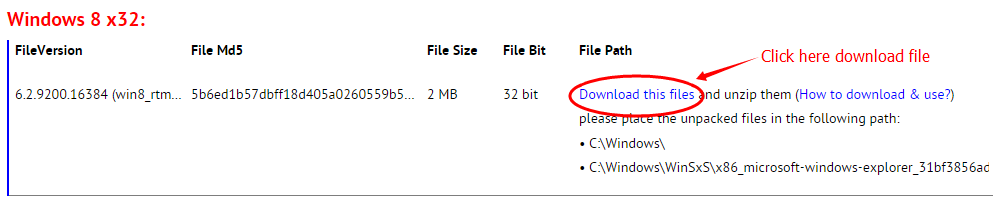
Next, please confirm your verion of OS, and select the proper download link.
click "Download this file" to enter its download page.
click "Download this file" to enter its download page.
File Finder:
• Can't find the version of the file you need?
• The downloaded file cannot be used due to unstable network?
You can try to use this file finder. The method is very simple. Enter the file name, and you will find many versions of this file. Select the file version you need to download, this tool will automatically download a complete file for you.
Click Here Download File Finder

If you have any further questions or need help, please leave us a message:
 [2015-11-24]
 Geoff Donges
 Message
  Windows Vista
  Hi. I was writing the text below as I thought I may need to leave a message for help. As it turns out the problem is now fixed but the text might explain why some are reporting that replacing the corrupt artico.h1s file made no changes.
-------------------------------------------------------
I have a corrupted artico.h1s system file.
I downloaded the appropriate files from your web site & tried copying them over the originals. This would result in a "You don't have permission" box appearing, even though I am the administrator. I tried a few things & couldn't copy the file over the top of the original. So I then just deleted the original file & then copied the downloaded file into that location (all three locations with the proper file version).
I'm pretty damn sure I have no Malware or viruses on this computer and note that you mention having some people report that after this, they still had the same problem. I'm another. Tried re-booting & running sfc several times, even in safe mode but still the same.
Today I looked at https://support.microsoft.com/en-us/kb/929833#bookmark-manually%20repair & followed their instructions to take ownership, grant administrator & copy freshly downloaded artico.h1s files from your site into the appropriate places, via the Cmd prompt.
After a re-boot I'm going to run another sfc scan (after doing the above).
If this doesn't work I will re-install the original files from the Recycling Bin & do the MS manual repair method again. If that fails, I'm at a real loss.
-------------------------------------------------------
Yipee. It worked. I'm ecstatic.
Thank you.
Reply
Leave a Reply
Your email address will not be published. Required fields are marked *
Your email address will not be published. Required fields are marked *
Files List:
Other Files Information:
Download appwin.h1s FileDownload artconm.h1s File
Download artcont.h1s File
Download artconv.h1s File
Download artconw.h1s File
Download artuic.h1s File
Download artuical.h1s File
Download artuiv.h1s File
Download artuiw.h1s File
Download auxdisp.h1s File
Top Download:
Download bootmgfw.efi FileDownload EXPLORER.EXE File
Download cplexe.exe File
Download winload.exe File
Download SLUI.exe File
Download convlog.exe File
Download bootmgr.efi File
Download ntkrnlpa.exe File
Download L3CODECX.AX File
Download HYPERTRM.EXE File
If you need help, please contact support@pconlife.com through E-mail
Copyright© 2015-2026 pconlife.com All Rights Reserved.